

Introduction
As you walk through the forest, you reach a large wooden door.
A toucan appears beside it and says:
“This door only opens if both torches are lit at the same time.
If only one is lit, the door won’t move.
Here we use AND logic.”
Your mission is to test this behavior using the logic gate simulator.

What is the AND gate?
- It has two inputs and one output.
- The output turns on (
1) only if both inputs are on (1). - If one or both inputs are off (
0), the output stays off (0).
See full truth table
| Input A | Input B | AND Output |
|---|---|---|
| 0 | 0 | 0 |
| 0 | 1 | 0 |
| 1 | 0 | 0 |
| 1 | 1 | 1 |

Simulator instructions
1. Place the components
- Make sure you are in Edit mode.
- From the left sidebar, click on:
- Input ➔ place two inputs (A and B).
- AND Gate ➔ place an AND gate.
- Output ➔ place an output to the right of the gate.
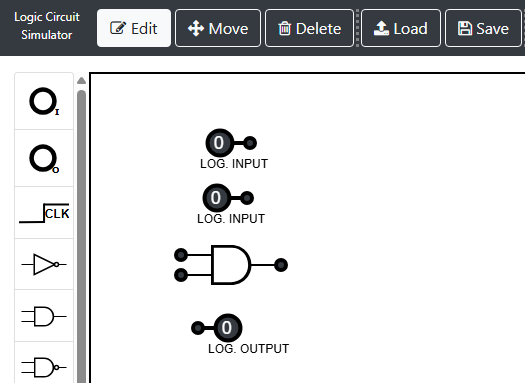
2. Connect the components
- Click on the output circle of Input A, then click on one of the AND gate inputs.
- Repeat the same with Input B.
- From the AND gate output, connect to the Output circle.
3. Test the circuit
- Click on each input to toggle between
0and1. - Try all possible combinations.
- The Toucan’s door only “opens” (output = 1) when Input A is 1 and Input B is 1 (A=1 AND B=1).
Simulator
 InputSet 0 or 1
 OutputShows the result
 ANDBoth must be 1
 OREither can be 1
 NOTReverses 0 and 1
What did you learn?
- AND represents conditions that must be met together: the output is only activated when A = 1 and B = 1 at the same time.
- If one of the inputs is 0, the output will also be 0, with no exceptions.
Next up
In the next activity, you will walk down the trail until you meet the Sloth and discover how the OR gate works.