Click the link below to build the Costa Rica app yourself:
Great! Now we are going to build step by step a component to save turtles on Tortuguero Island.
Imagine that React is a huge box full of LEGO pieces. Each piece (component) has a job, for example:
- One piece can be a button
- Another piece can be a screen
- Another can be a list
- Another can be an image
When you put all those pieces together... your complete application is formed!
Let’s get started!
import { useState } from "react";
What does import { useState } from "react"; mean?
In React, some tools are not ready to use right away. You have to request them from the React toolbox. useState is one of those special tools that lets us store things that change.
For example: how many turtles are left to save.
export default function Tortugero() { }
What is export default function Tortugero()?
Here we are creating a component. export default means: "This is the main file, you can use it in other places".
function Tortugero() is the name of the component. Like a box that says: "This is Tortugero".
What is const [tortugas, setTortugas] = useState(0);?
Imagine we have a magic box where we store a number. That number is the amount of turtles saved.
- tortugas → what is in the box (a number)
- setTortugas → the magic key that lets you change that number
- useState(0) → starts at 0 turtles saved
This is how React remembers how many turtles you have saved.
What is const total = 10;?
This number is the goal of the game: there are 10 turtles trapped in Tortuguero! Here we are saying: "We must save 10 turtles".
You could change it to another number to make the game easier or harder.
What does const salvarTortuga = () => { }; do?
This function is triggered when we click the "Salvar tortuga" button.
- It checks if there are still turtles left to save →
tortugas < total - If yes, it adds one more turtle →
setTortugas(tortugas + 1)
Each click rescues a new turtle.
if (tortugas < total) setTortugas(tortugas + 1);
What does reiniciar() do?
When we finish the mission, we can start over. This function sets the turtle counter back to 0.
This way you can play again from the beginning.
const reiniciar = () => setTortugas(0);
<p>Has salvado {tortugas} de {total} tortugas</p>
Here the turtles you have saved and the total will be displayed.
return (
    <div className="Tortugero">
      <h2>Parque Nacional Tortuguero</h2>
      <p>Has salvado {tortugas} de {total} tortugas</p>

      {tortugas < total ? (
        <button onClick={salvarTortuga}>Salvar tortuga</button>
      ) : (
        <>
          <p className="exito">Todas las tortugas están a salvo!</p>
          <button onClick={reiniciar}>Reiniciar misión</button>
        </>
      )}
    </div>
  );
The button responds to the salvarTortuga function to keep adding rescues
The reset button clears the mission so you can rescue more turtles.
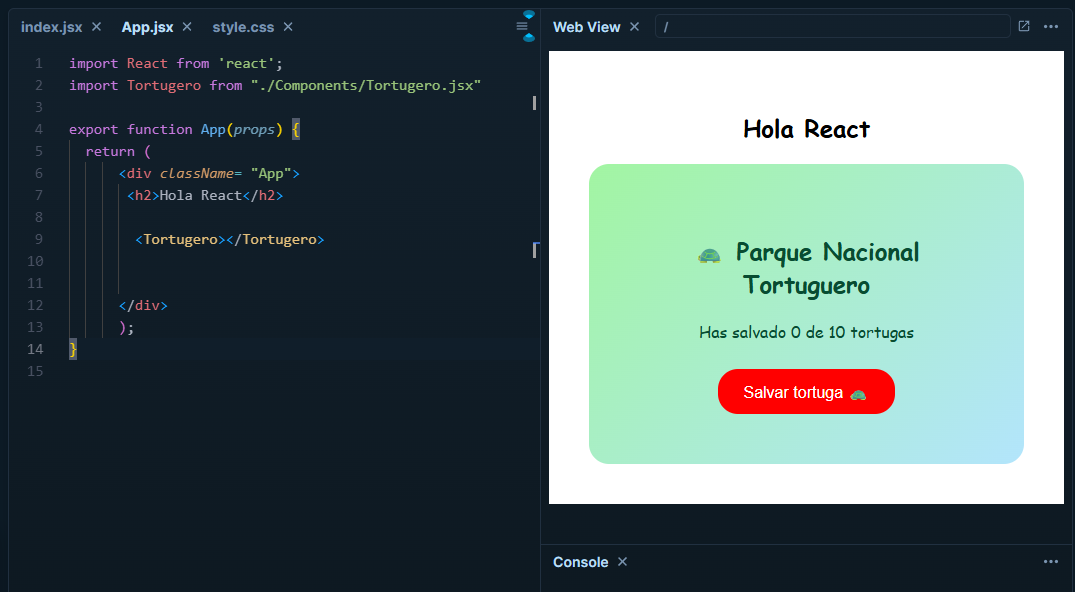
Then to display what we just built, we need to import it in "App.jsx"
import Tortugero from "./Components/Tortugero.jsx"
With the name "Tortugero" we can implement a new “tag” and display everything contained in the file "Tortugero.jsx"